

Note: This training is for the Spring Course, but it’s the same for the Fall Course
JV Partner Training with Christina Hills (20 min)

Click to Play
Video 1: The Correct Way to Get Your Affiliate Links (1 min)

Watch that video above to see the correct way to get your affiliate links.
Video 4: Advice on Why to Offer Bonuses to Your Community (6 min)
In this video above, Danny Bermant and Christina Hills go over how to get the most out of this launch so you can make the most sales
Video 5: How to get your click and sales stats in Thrivecart
How to Check Your Affiliate Stats in ThriveCart
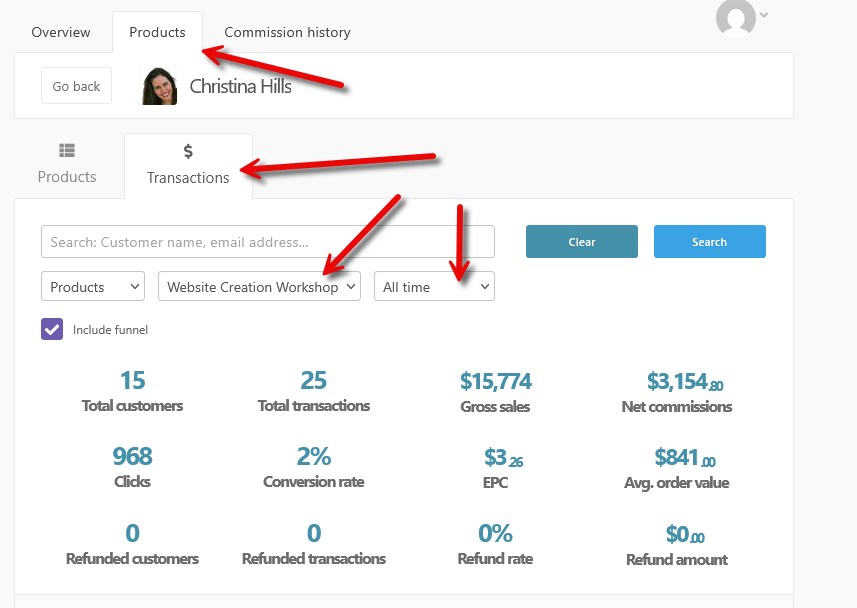
Follow these steps to view your affiliate stats. (See the screenshot below for reference.)
- Log in to your ThriveCart affiliate area here: https://thrivecart.com/signin/
- Click on the “Products” tab.
- Then click on “Transactions”.
- Use the dropdown menu to select the product you’re promoting.
- Choose the time frame you’d like to view.
Your affiliate stats should now be displayed. See image below.
New to affiliate marketing?
Read the FAQ here